
DuckDuckGo Launches Free Ad Blocker for YouTube*
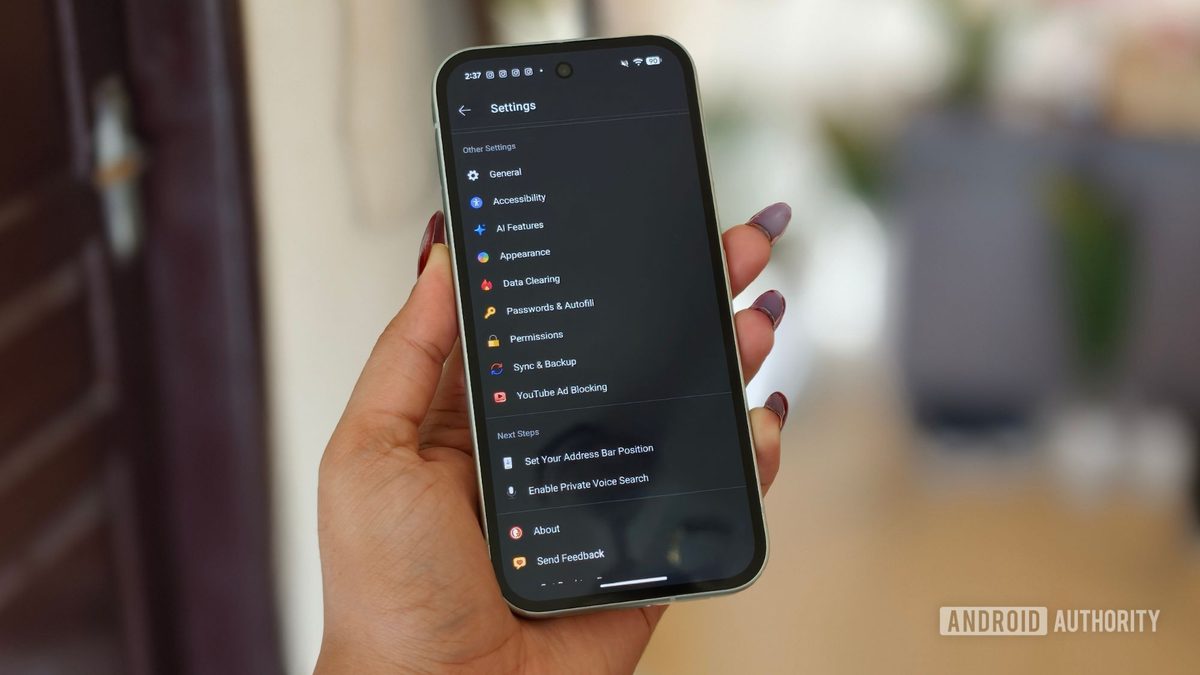
Photo: Android Authority
Quick answer
DuckDuckGo has introduced a free ad blocker for YouTube* that works across all major platforms. The tool leverages uBlock Origin filters and proprietary algorithms to bypass YouTube* restrictions.
DuckDuckGo has released a free tool to block ads on YouTube*, available in its browser across all major platforms. The solution uses uBlock Origin community filters, regularly updated to counter changes in YouTube*’s ad-serving algorithms. Additionally, DuckDuckGo has implemented its own optimizations to minimize the risk of ad blocker detection.
On iOS, macOS, and Windows devices, the tool is enabled by default—users simply need to update the DuckDuckGo browser to the latest version. Android users must manually activate the feature in settings via the "YouTube ad-blocking" option under "Other Settings." In tests on Google Pixel 10a, iPhone, MacBook, and Windows PCs, ads were completely removed, and videos played without delays.
Beyond ad blocking, DuckDuckGo offers Duck Player—a built-in video player that enforces strict YouTube* privacy settings. When watching through Duck Player, no watch history is saved, cookies are not tracked, and recommendations remain unaffected by viewed content. Both tools can be used simultaneously for maximum protection against ads and data collection.
DuckDuckGo’s developers have not disclosed all details of the ad blocker’s functionality but emphasize that it does not directly violate YouTube*’s rules. Instead, it employs legal content-filtering methods similar to those used in popular browser extensions. While the tool currently works reliably, its future depends on YouTube*’s response to such initiatives.
Common questions
- How does DuckDuckGo’s ad blocker work on YouTube*?
- The tool uses regularly updated uBlock Origin community filters along with DuckDuckGo’s own optimizations to bypass YouTube* restrictions and block ads without a subscription.
- On which devices does DuckDuckGo’s ad blocker work?
- The ad blocker is available in the DuckDuckGo browser on Android, iOS, Windows, and macOS. Manual activation is required on Android, while it is enabled by default on other platforms.
- What is Duck Player, and why is it needed?
- Duck Player is DuckDuckGo’s built-in video player that enforces strict YouTube* privacy settings. It does not save watch history, track cookies, or influence recommendations, ensuring anonymous viewing.
Dzen feed: /feed/dzen.xml · RSS: /feed.xml