
ESP32-S3 for 509 ₽: How to Turn the Board into an Ad Blocker in Minutes
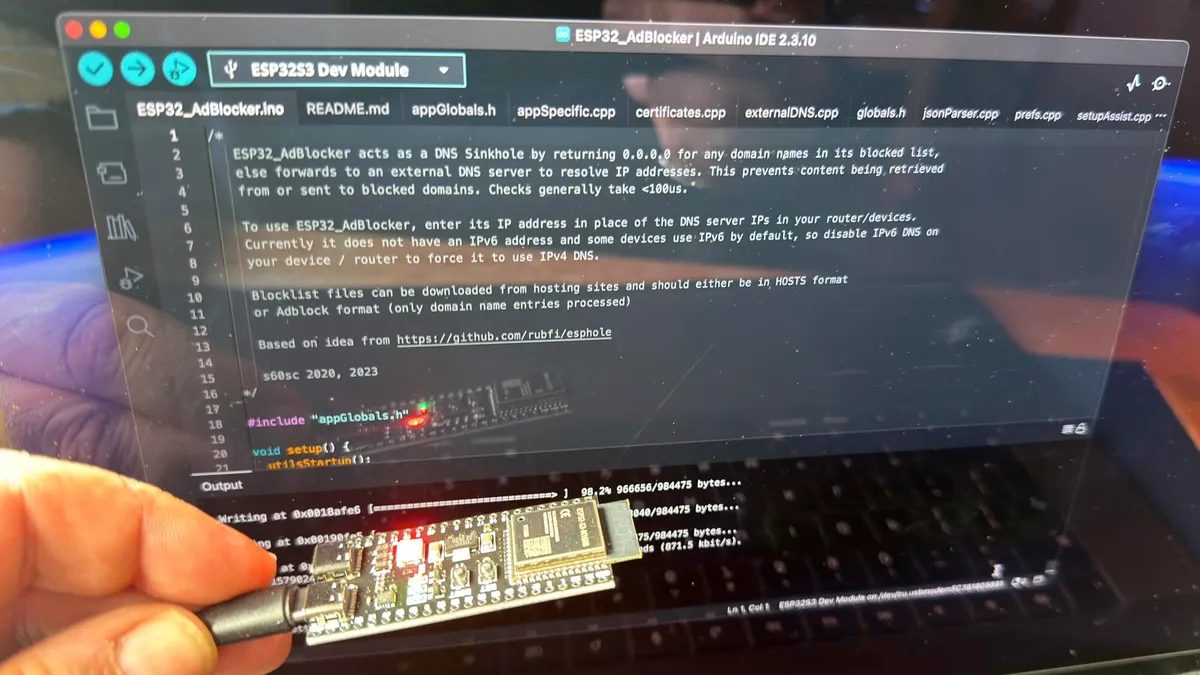
Photo: ZDNet
Quick answer
For just 509 ₽ the ESP32-S3 can be converted into a DNS ad blocker using the ESP32_AdBlocker software. The device acts as a sinkhole, redirecting ad domain requests to a non-existent address, saving bandwidth and…
Rising Raspberry Pi prices have led many to seek more affordable alternatives for small projects. One such solution is the ESP32-S3 board, which costs under 727 ₽ and can function as an ad blocker for home networks. Unlike the Raspberry Pi, the ESP32-S3 consumes minimal power and requires no additional components like a microSD card.
Setting up the ESP32-S3 is simple: just upload the pre-built ESP32_AdBlocker code via Arduino IDE. Once connected to a computer, the board becomes a Wi-Fi access point. Users can then connect to it, configure their home network settings, and select a list of domains to block. The device operates as a DNS sinkhole, redirecting ad content requests to a non-existent address, effectively preventing ads from loading.
This solution is ideal for temporary use, such as when internet bandwidth is limited. However, it has limitations: it does not block YouTube ads or support IPv6. For long-term use, experts recommend a Raspberry Pi Zero 2 W with PiHole, though this option is more expensive—starting at 1100 ₽ for the board plus a microSD card.
The ESP32-S3 demonstrates how inexpensive microcontrollers can tackle practical tasks without complex configurations. This project is particularly relevant for enthusiasts looking to optimize their network performance without significant investment.
Common questions
- How does the ESP32-S3 block ads?
- The ESP32-S3 functions as a DNS server, filtering requests to ad domains. When an ad attempts to load, the device redirects the request to a non-existent address (0.0.0.0), preventing the ad from displaying.
- What are the limitations of this method?
- This method does not block YouTube ads, as they are served from the same servers as video content. It also does not support IPv6 addresses. For long-term use, a Raspberry Pi with PiHole may be a more robust solution.
- What do I need to set up the ESP32-S3?
- You’ll need an ESP32-S3 board with 8MB PSRAM, a USB-C cable, Arduino IDE, and the ESP32_AdBlocker software. Setup involves uploading the code, connecting to Wi-Fi, and configuring your network’s DNS settings to use the device.
Dzen feed: /feed/dzen.xml · RSS: /feed.xml