
Firefox Adds Productivity Widgets to Homepage
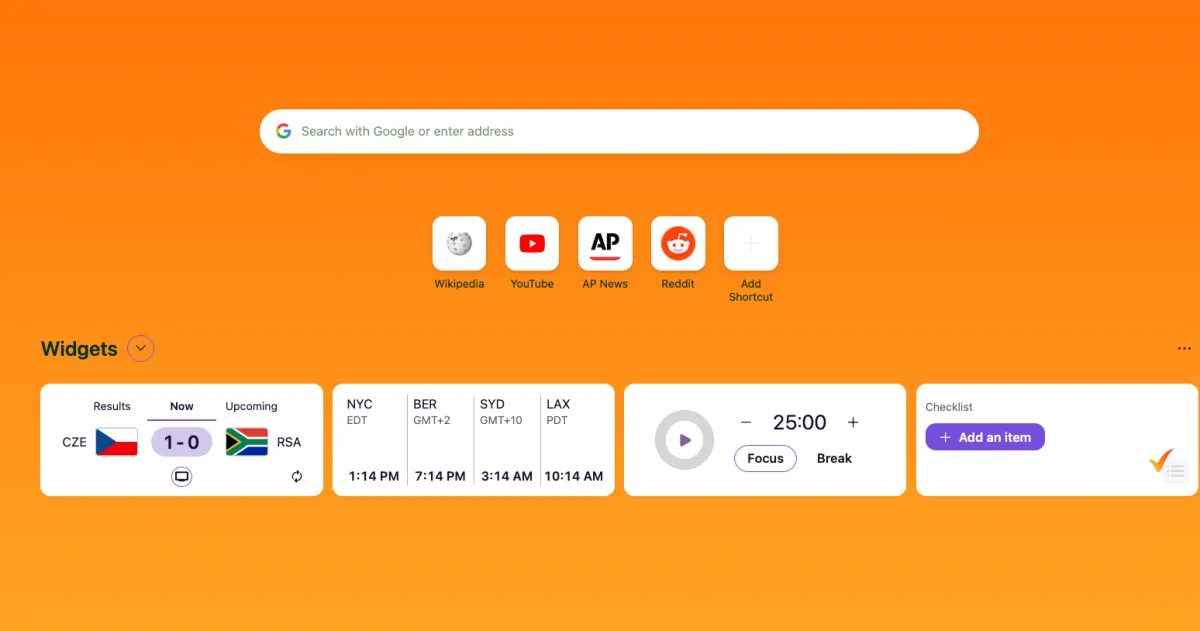
Photo: The Verge
Quick answer
Mozilla has integrated productivity widgets into Firefox, featuring a Pomodoro timer, checklist, time zone display, and sports scores to streamline workflows.
Mozilla has introduced new productivity widgets in Firefox, designed to help users manage time and tasks more efficiently. These tools are integrated into the browser’s homepage and include a Pomodoro timer, checklist, time zone display, and sports scores. The features are now available in the latest versions of Firefox and are part of a broader interface update.
The default Pomodoro timer is set to 25-minute work intervals with 5-minute breaks, but users can customize these settings. Widgets are fully adjustable—users can add, remove, or expand them via the homepage customization menu. A timer completion notification ensures users stay on track without constant time checks.
These updates align with Mozilla’s roadmap, which includes other enhancements like the Project Nova redesign. The goal is to simplify workflows by reducing reliance on external task and time management apps.
Common questions
- What new widgets are available in Firefox?
- Firefox now includes widgets like a Pomodoro timer, checklist, time zone display, and sports scores. These can be customized or disabled via the homepage customization menu.
- How do I adjust the Pomodoro timer in Firefox?
- The default timer runs on 25-minute work and 5-minute break intervals, but users can modify these settings. Notifications alert users when a session ends.
- Which Firefox versions support these widgets?
- The new widgets are available in Firefox versions 151 and 152, part of updates leading up to the Project Nova redesign.
Dzen feed: /feed/dzen.xml · RSS: /feed.xml