
Google Drive Introduces AI-Powered Automatic File Sorting
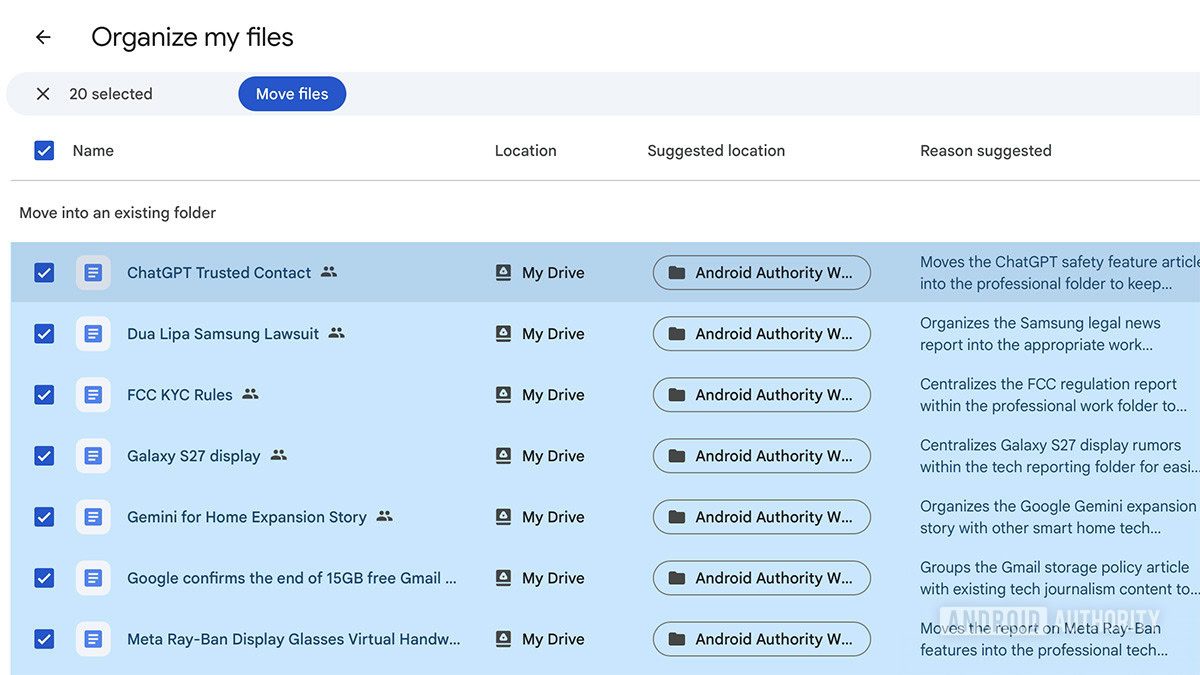
Photo: Android Authority
Quick answer
Google расширяет доступность функции «Organize My Files» в Google Drive, которая с помощью искусственного интеллекта предлагает пользователям оптимальные варианты сортировки файлов. Инструмент анализирует содержимое хранилища и автоматически группирует документы по существующим или новым папкам, упрощая организацию данных. Функция уже доступна корпоративным клиентам и подписчикам AI-планов компании.
Google is integrating a new artificial intelligence-powered feature into Google Drive to help users organize their storage. The tool, named 'Organize My Files,' analyzes files and suggests moving them into existing or new folders for a more streamlined structure.
The feature appears in the 'My Drive' section and parent folders as the 'Suggest File Moves' option. Once activated, the AI automatically identifies files that can be grouped and proposes possible actions. For instance, it may consolidate documents from a single project into one folder or create a new category for scattered data.
Users retain full control over the process: they can adjust AI-suggested options, select or exclude files, and preview content in a separate tab or pop-up cards. After confirming changes, Google Drive automatically moves files to the specified folders.
Currently, the feature is available in English for Google Workspace users and subscribers of AI plans, including Google AI Ultra, Pro, as well as educational and advanced tiers. Google continues to test the tool, gradually expanding its availability.
Common questions
- Common questions
- Google расширяет доступность функции «Organize My Files» в Google Drive, которая с помощью искусственного интеллекта предлагает пользователям оптимальные варианты сортировки файлов. Инструмент анализирует содержимое хранилища и автоматически группирует документы по существующим или новым папкам, упрощая организацию данных. Функция уже доступна корпоративным клиентам и подписчикам AI-планов компании.
Dzen feed: /feed/dzen.xml · RSS: /feed.xml