
Google Gemini Allows Removal of Visible Watermarks from AI-Generated Content
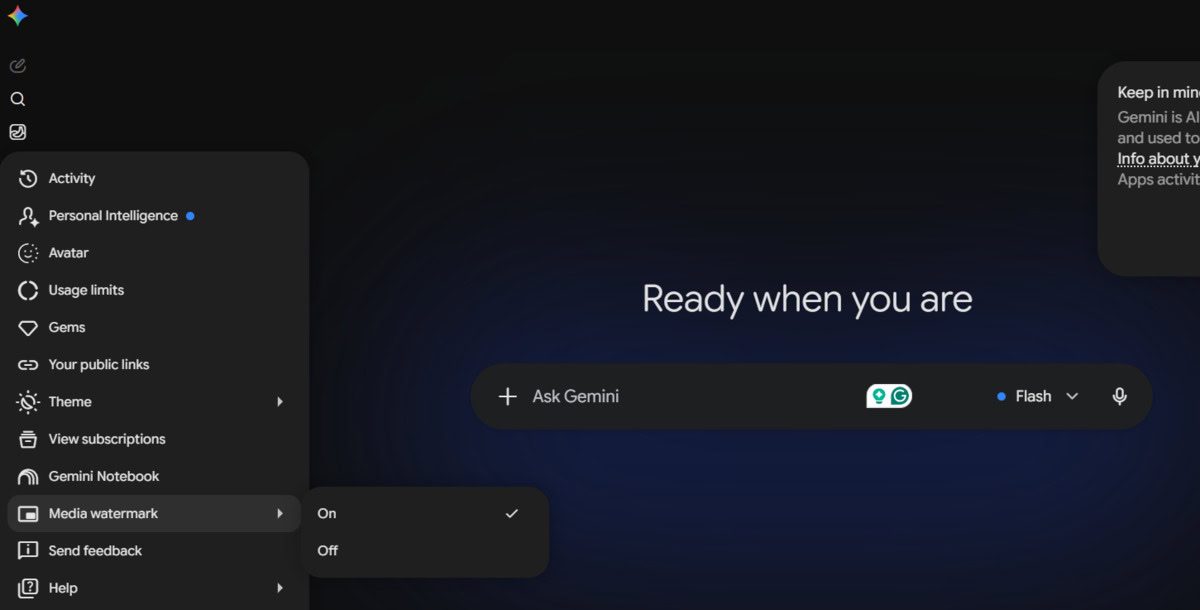
Photo: Android Authority
Quick answer
Google Gemini now lets users disable visible watermarks on AI-generated images, videos, and music via the Media Watermark settings.
Google has added a new setting to its generative AI service, Gemini, allowing users to remove visible watermarks from generated content. The Media Watermark option, located in the settings menu, lets users disable branding for images, videos, and music tracks.
Previously, all materials generated by Gemini automatically included a prominent watermark. However, with the update, users can now choose whether to keep or hide it. Google emphasized that technical tags—including invisible SynthID and C2PA metadata—will remain in files to identify AI-generated content.
The change follows user feedback. Josh Woodward, Google's Vice President overseeing Gemini, previously noted that the request to remove watermarks ranked among the top 10 most popular service requests. The new feature will be available to all users over the next few days.
Common questions
- Why did Google add the option to remove watermarks in Gemini?
- The feature was introduced based on user requests who found the visible branding excessive. Google retained invisible tags for AI content tracking.
- Which types of content does this change affect?
- The option applies to images, videos, and music files generated by Gemini. Invisible tags remain in all cases.
- How do I disable the watermark in Gemini?
- Go to the service settings, find the Media Watermark section, and toggle the option to 'Off'. Changes take effect after saving.
Dzen feed: /feed/dzen.xml · RSS: /feed.xml