
Google Messages Introduces Secure Mode for Smart Replies
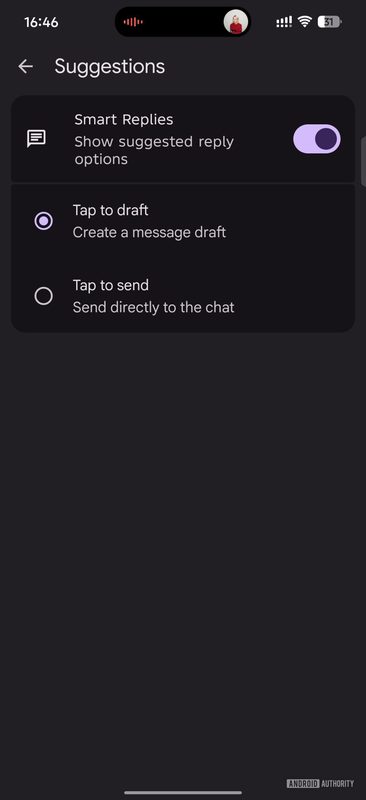
Photo: Android Authority
Quick answer
Google обновляет приложение Messages, добавляя функцию «Tap to draft», которая заменяет мгновенную отправку умных ответов на более безопасный вариант. Теперь пользователи смогут предварительно просматривать и редактировать предложенные ИИ фразы, прежде чем отправить их собеседнику. Изменение направлено на снижение риска случайных отправок и повышение контроля над сообщениями.
Google Messages has received a significant update that changes how the Smart Reply feature works. Previously, smart replies were sent instantly upon tapping, which could lead to unintended messages. Now, the app introduces 'Tap to draft' mode: the selected reply option is inserted into the editing field, allowing users to modify or add to it before sending.
The feature is now available in the stable version of the app (20260522_00_RC00) and is gradually rolling out to all Android users. By default, the old 'Tap to send' mode remains active, so users must manually enable the new behavior in the 'Suggestions & Actions' settings section.
Developers highlight that the update reduces risks associated with automatic replies and provides greater flexibility in conversations. 'Tap to draft' was previously tested in Google Messages beta versions and has now officially launched in the stable build. The change does not affect the core functionality of the messenger but makes AI suggestions more intentional.
Common questions
- Common questions
- Google обновляет приложение Messages, добавляя функцию «Tap to draft», которая заменяет мгновенную отправку умных ответов на более безопасный вариант. Теперь пользователи смогут предварительно просматривать и редактировать предложенные ИИ фразы, прежде чем отправить их собеседнику. Изменение направлено на снижение риска случайных отправок и повышение контроля над сообщениями.
Dzen feed: /feed/dzen.xml · RSS: /feed.xml