
Opera Implements Vertical Tabs — The Best Implementation on the Market
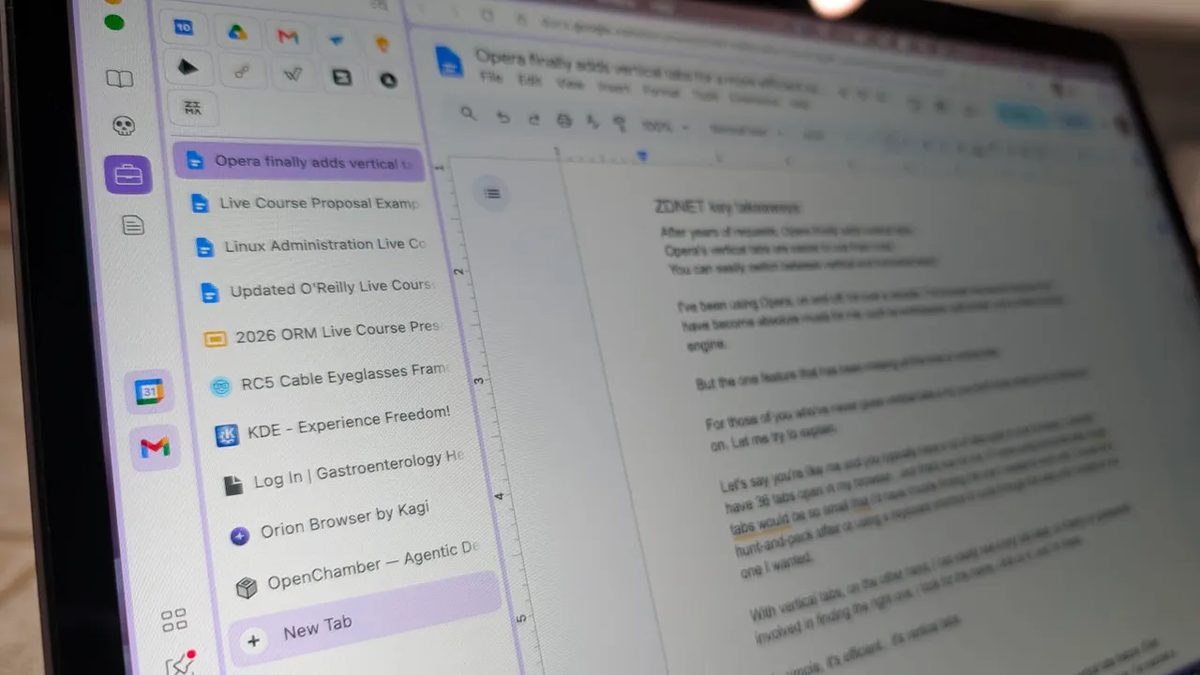
Photo: ZDNet
Quick answer
Opera has introduced vertical tabs, streamlining workflows with numerous open pages by providing quick access to tab names.
The Opera browser development team has introduced native vertical tab support, one of the most in-demand features among users. The new feature displays open pages as a list on the left side of the window, significantly simplifying navigation when multiple tabs are open simultaneously.
Unlike horizontal tabs, which become too small for comfortable reading when numerous tabs are open, the vertical mode ensures full or partial visibility of page titles. This eliminates the need to use keyboard shortcuts or manually scroll through the tab bar to find the right one.
A standout feature of Opera’s implementation is the seamless switching between vertical and horizontal modes. To toggle, simply right-click on any tab or empty space in the tab bar and select the appropriate menu option. All pinned tabs and workspaces are preserved, eliminating the need for reconfiguration.
Users can also adjust the width of the vertical tab panel by dragging the divider between the list and the main viewing area. This allows flexible customization of the interface based on current tasks, such as expanding the viewing area for web page work.
The new feature is available in the latest version of the Opera browser. Users can update the application via the built-in "Update & Recovery" section or download the latest build from the developer’s official website.
Common questions
- Why are vertical tabs useful in a browser?
- Vertical tabs make it easier to manage multiple open pages by displaying tab names in a list format rather than a narrow strip. This simplifies finding the right tab without scrolling or using keyboard shortcuts.
- How do you switch between vertical and horizontal tabs in Opera?
- To switch, right-click on any tab or empty space in the tab bar and select the corresponding menu option. All pinned tabs and workspaces remain intact.
- Which browsers support vertical tabs?
- Vertical tabs are already available in browsers like Vivaldi and Firefox. Opera has now joined them, offering one of the most user-friendly implementations.
Dzen feed: /feed/dzen.xml · RSS: /feed.xml